


I’ve been using ChatGPT for all sorts of things over the past few years, and that’s the lesson I keep coming back to.
People often ask what’s the difference between searching for information in Google, and asking ChatGPT a question. Google is like asking a librarian to go fetch books that reference a source you are finding information on. A generative AI like ChatGPT is more like asking the librarian to study the information available to them, make sense of it, and then explain the subject to you in a way that answers your particular question.
The catch is that your AI librarian can occasionally be confidently wrong.
I wrote a Watching the World Change article recently on how AI has revolutionized the way I use computers. That post was largely historical and dealt with the way computing has changed over the past fifty years. Over the past few years, I’ve been using ChatGPT for a lot of different things, and I wanted to share some tips, tricks and insights I’ve found.
Future posts will look at some of the ways I’ve been using ChatGPT—including health, homes and gardens, graphics, music, finance and travel.
Along the way I’ll share some of the things I’ve learned about getting useful results—and some of the things that don’t work so well.
Hopefully you’ll find some of these tips useful. Let me know what you think!
First off, let’s look at how we got here.
Oh Baby! You’ve Grown Up So Fast!
Artificial intelligence itself isn’t new. Researchers have been working on it for decades. But for most of that time, AI was something happening largely out of sight.
That changed dramatically on November 30, 2022, when OpenAI released ChatGPT to the public. Suddenly, ordinary computer users could sit down and have what felt remarkably like a conversation with a computer.
ChatGPT was generative AI: rather than simply retrieving existing information, it could generate new text in response to what you asked it.
Four years later, these systems can do far more than answer questions. They can work with photographs and documents, search the web and, increasingly, carry out multi-step tasks on our behalf.
Just Start Talking
You don’t have to construct the perfect question to pose ChatGPT, learn special terminology or know anything about artificial intelligence. The useful skill is learning to have a conversation: explain what you’re trying to accomplish, look at the answer, correct it, add information, ask follow-up questions and gradually get somewhere useful.
How you converse with ChatGPT – as a friend, assistant, collaborator or even confidant – is entirely your choice. My preference is to think of it as my assistant – an assistant that has abilities that enhance my own skills. It has access to vastly more information than I could ever keep in my head, can offer insights, and can collate and interpret information at a speed I could never match.
You have the initial request – plan a trip, design a backyard, remodel a kitchen, interpret your medical visit results. You don’t need to phrase the first question perfectly. Start by telling ChatGPT what you want to accomplish. Then tell it what it got wrong, what it doesn’t know about you yet, and what matters most.
If you don’t phrase your requests carefully, you could end up going down a rabbit hole with a lot of interesting but off-target information.
Want to take a vacation?
Ask ChatGPT to plan a trip and it can help you work through the whole problem: where to go, how to get around, where to stay, what things cost and how to turn all of that into an itinerary. Let’s put this in the form of an example to show you how a successful session with ChatGPT might look:
START HERE
“I’m thinking about spending ten days in Italy next May.”
That would get you some fairly generic suggestions about which parts of Italy might be worth visiting. Useful, perhaps, but nothing particularly tailored to you.
NOW ADD WHAT MATTERS
Now let’s think ahead – what do you really want from that trip? For example:
My wife and I don’t want to change hotels every night. We’d rather use trains than rent a car, and we’re more interested in smaller towns and good food than nightlife.
Now the answer becomes much more useful.
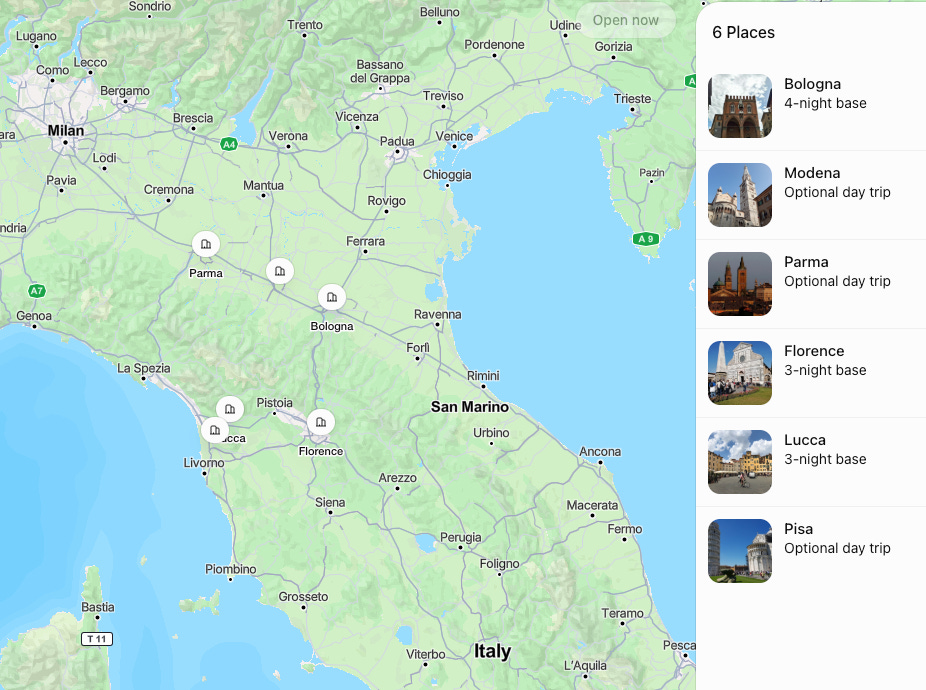
ChatGPT would then suggest a couple of main bases to build the trip around, depending on your preferences – cuisine, architecture, history, outdoors and so on.
REFINE IT AGAIN
Take it a step further:
I’d like to include Florence, but I don’t want to spend the whole trip sightseeing. Give us a couple of days when we don’t have anything planned.
ChatGPT then provides a detailed day-by-day itinerary, with details. You might want to take it even further:
ASK FOR SPECIFICS
Can you provide a list of hotels that would fit the itinerary? I normally use booking.com for my reservations.
And ChatGPT then provides a hotel shortlist, with the advantages of each hotel.
And how about a sanity check?
ADD YOUR BUDGET
I don’t want to spend more than $250 a night.
ChatGPT may have to adjust your preferred hotels – but in the test I just ran, most of its original choices were still available!
Notice what I didn’t do. I didn’t spend ten minutes constructing a complicated “perfect prompt.” I started with a simple question and then kept adding information. Each time, ChatGPT knew a little more about what I actually wanted, and its answers became more useful.
That’s the trick.
But why ChatGPT?
ChatGPT isn’t the only choice. There’s Google’s Gemini, Microsoft’s Copilot, Anthropic’s Claude, Perplexity and Meta AI, among others. I use ChatGPT for most everyday tasks and Copilot at work, largely because they fit the way I work—not because I think everyone else should make the same choice.
I’ll compare the main alternatives in another article.
It’s a Conversation
The point isn’t that ChatGPT can plan a vacation. Google could already help you find hotels, trains and things to do.
What’s different is the conversation. You can start with a vague idea, add what matters to you, reject suggestions, impose a budget, change your mind and keep refining the result.
You don’t have to learn how to talk to a computer: you just have to talk to it.
That’s where we’ll start.